
A professor at a mid-size university opens her laptop on the second Monday of the semester. She has 140 students across three sections, a paper sign-in sheet from last Tuesday that never made it into the LMS, and a department chair asking for attendance compliance data by Friday. The spreadsheet she started in week one already has duplicate entries. She’s weighing whether the new attendance app IT recommended is worth the twenty minutes it’ll take to figure out, or whether she should just keep passing around the clipboard.
That moment, right around day eight or nine of the term, is where most classroom management technology adoptions live or die. The tool either reduces friction fast enough to justify the learning curve, or it becomes one more tab to close. The stakes aren’t abstract: institutions that can’t produce reliable attendance and engagement data face accreditation questions, and faculty who waste the first five minutes of every session on logistics lose roughly twelve hours of instructional time per semester.
What counts as classroom management technology in higher ed?
The term covers any software or hardware that helps faculty or administrators handle attendance, engagement, behavior tracking, communication, or device oversight during instructional time. That’s a wide net, so narrowing it into functional groups makes the category easier to evaluate.
| Category | What it does | Typical use case |
|---|---|---|
| Attendance and check-in tools | Record who showed up, when, and how often | A 200-seat lecture where roll call would consume ten minutes |
| Engagement and polling platforms | Capture real-time student responses during class | Mid-lecture comprehension checks that replace end-of-unit surprises |
| Device monitoring and access control | Restrict or observe what students do on screens | A computer lab exam where browser lockdown prevents tab-switching |
| Communication and notification systems | Push alerts, reminders, or updates to students | Automated absence notifications sent within an hour of a missed class |
This article doesn’t cover full learning management systems, grading-only tools, or campus-wide student information systems. Those overlap with classroom management technology, but their primary function sits elsewhere: course content delivery, transcript management, and financial aid processing.
Why does the narrowing matter?
According to Instructure’s EdTech Top 40 report, school districts used an average of 2,739 edtech tools in the 2023–24 school year. Higher ed institutions face a similar sprawl. When everything from the LMS to the campus wayfinding app gets lumped under “classroom technology,” faculty can’t tell which tools actually affect what happens inside a lecture hall. The four categories above identify the tools that directly affect instructional time.
Why foundational management practices come before any tool
Researchers and practitioners typically describe four types of classroom management: instructional management (how content is paced and structured), behavioral management (how expectations and consequences are set), environmental management (how the physical or digital space is arranged to reduce distraction), and organizational management (how routines, transitions, and record-keeping are handled). Technology tools map most directly onto organizational and behavioral management, which is why the practice layer underneath any tool matters so much.
A well-designed attendance app won’t fix a class without a consistent check-in routine. This sounds obvious, but it’s the single most common failure pattern in classroom management technology rollouts: the institution buys the tool before establishing the practice the tool is supposed to support.
Research backs this up with hard numbers. John Hattie’s meta-synthesis of over 800 studies found that classroom management practices carry an effect size of roughly d = 0.5–0.6 on student achievement. That range places management practices well above the average intervention effect. The What Works Clearinghouse practice guide identifies the specific practices that drive those results: explicitly taught routines, efficient transitions supported by visual cues, clearly defined expectations, and positive reinforcement.
Technology amplifies these practices. It doesn’t replace them.
Consider a concrete scenario. An institution deploys a new attendance app across fifteen sections without first establishing a consistent check-in routine. Faculty in those sections spend the first five minutes of class troubleshooting Bluetooth connections, explaining the app to students who didn’t download it, and answering questions about whether check-in counts toward a grade. Students learn quickly that the check-in window is a free pass to arrive late, chat, or skip entirely. By week three, six of the fifteen instructors have reverted to paper rosters. The app didn’t fail, the routine underneath it never existed.
Korpershoek et al. (2016) reinforced this in a meta-analysis published in the Review of Educational Research, finding positive effects of classroom management strategies on academic, behavioral, emotional, and motivational outcomes. The strategy matters more than the specific tool. An instructor who has a tight two-minute check-in routine, a clear late-arrival policy, and a visible seating chart will get more value from even a basic attendance tracker than a colleague with no routine and the most sophisticated platform on the market.
So what does this mean for administrators choosing tools? It means the rollout plan should start with the practice, not the purchase order.
Attendance and check-in tools: the highest-impact starting point
Attendance tracking is the single highest-ROI category for higher ed faculty adopting classroom management technology. It touches every class session. It generates the compliance data administrators need for accreditation and financial aid verification. And it’s the one workflow where a digital tool can save measurable time compared to the paper alternative, every single day of the semester.
The main check-in methods available on mobile devices each present a different trade-off between speed, accuracy, and student friction:
- Manual roll call is the slowest but requires zero student preparation. It works for seminars of twenty but collapses in a lecture of eighty.
- Barcode scanning with a device camera is fast per student but creates a physical bottleneck, everyone lines up at one device.
- Magnetic strip card swipe is faster still, but requires a card reader peripheral and assumes every student carries a valid ID.
- Self-check-in, where students tap a button on a shared device or kiosk, distributes the workload but introduces a trust gap, how does the instructor verify the student is actually present?
AccuClass supports all four methods on a single iOS or Android device. Faculty don’t need dedicated hardware or separate apps for different scenarios. That flexibility matters most in the first two weeks of a semester, when an instructor might discover that the barcode workflow she planned doesn’t fit the room layout, and she needs to switch to self-check-in by Wednesday.
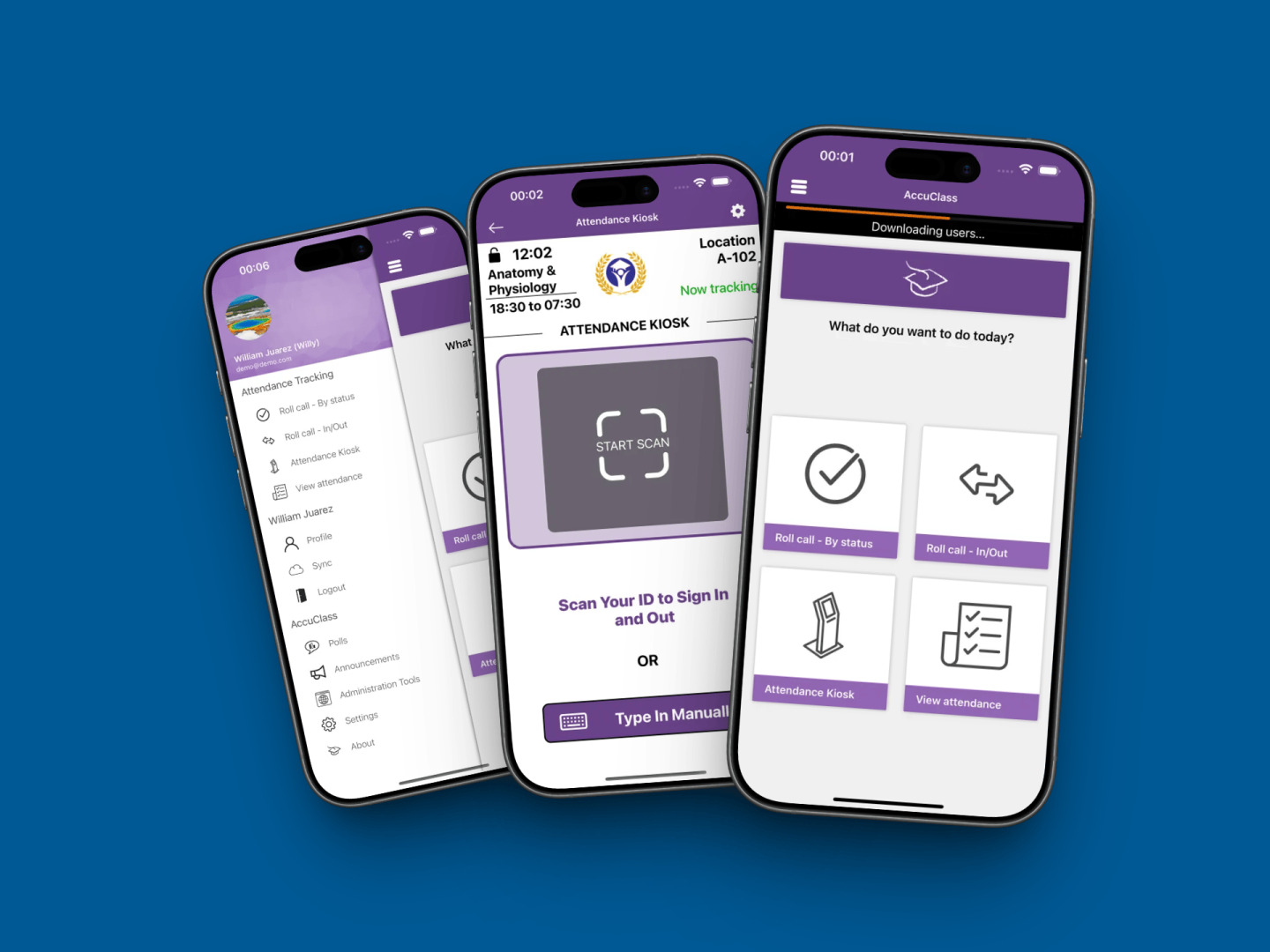
Where the “one device per classroom” assumption breaks down. A single instructor scanning 200+ student IDs with a barcode workflow can lose 8–12 minutes of class time at entry points. That’s not a minor inconvenience: it’s roughly 10% of a 75-minute lecture, gone before the first slide appears. Unless the room layout supports multiple entry lanes, self-check-in needs to run as a parallel option. AccuClass handles this by letting students self-check-in on the same device the instructor is using for barcode scans, so the line either moves faster or disappears entirely.
Examples of classroom technology in this category include mobile ID scanners, kiosk-based self-check-in stations, and polling devices, all of which fall under the attendance and check-in umbrella described earlier.
Quick in-class polls, a feature built into AccuClass, double as both engagement checks and informal attendance verification. A faculty member who opens each session with a one-question poll gets two data points from one action: who’s in the room, and whether they understood last session’s material. That’s a meaningful efficiency gain over running attendance and a comprehension check as separate workflows.
Accudemia
Your center helps more students than you can prove
Accudemia records every visit, appointment, and session on its own, then builds the reports deans, funders, and accreditors ask for. One college counted over 4,000 visits its previous tools had missed.
96 percent renewal across 500+ academic centers

Engagement, polling, and the creation-over-consumption principle
Students who are creating content, responding to polls, building artifacts, and collaborating on shared documents go off-task less frequently than students passively consuming content on a screen. This isn’t a theory. Any instructor who has watched a lecture hall full of open laptops knows that the moment a slide deck runs longer than twelve minutes without interaction, half the screens switch to email or social media.
Polling and response tools give faculty a real-time read on comprehension without waiting for a graded assignment. The feedback cycle shrinks from days to seconds. An instructor who sees that 60% of the room answered a concept-check question incorrectly can re-teach the point immediately, rather than discovering the gap on a midterm two weeks later.
The trade-off is setup friction. Polling tools that require students to download a separate app or create an account add 5–10 minutes of overhead on day one. That doesn’t sound like much, but in a 50-minute class with a packed syllabus, it’s enough to make an instructor skip the tool entirely. Tools that work through a browser, or are built into a platform students already use, like an attendance app with built-in polling, eliminate that barrier. The fewer logins, the higher the adoption.
Does this mean screens should be on for the entire class period? No. Practitioner consensus and research both point to alternating device-on and device-off segments within a single session. A practical structure: 15–20 minutes of device-based activity (a poll, a collaborative annotation, a short research task) followed by a non-device discussion or hands-on exercise. This rhythm keeps the technology from becoming background noise and gives students a reason to look up from their screens.
The creation-over-consumption principle also applies to how faculty design poll questions. A multiple-choice recall question is consumption. A short free-response prompt that asks students to apply a concept to a scenario is creation. The second type generates richer data and keeps students engaged longer, even though it takes thirty more seconds to answer.
FERPA, COPPA, and the privacy gates every tool must clear
Academic technology committees at mid-size institutions, roughly 3,000 to 20,000 students, consistently flag two questions before anything else: does this tool handle student data in a way that’s designed for FERPA (the Family Educational Rights and Privacy Act) alignment, and does it support institutional SSO? A tool that can’t answer both in the first vendor conversation rarely survives to a pilot, regardless of how well the attendance workflow demos.
FERPA’s relevance kicks in the moment a tool collects student identifiers. Names, student IDs, attendance records, poll responses tied to individual students, all of it falls under FERPA’s data protection requirements in a higher ed setting. Institutions need to confirm where data is stored, who can access it, and how it gets deleted when a student requests removal.
COPPA (the Children’s Online Privacy Protection Act) targets children under 13, which might seem irrelevant to higher ed. It isn’t. Institutions running dual-enrollment or early-college programs enroll minors regularly. The FTC reinforced its COPPA guidance recently, clarifying that edtech providers must limit data collection and cannot condition a student’s participation on unnecessary personal data. Any classroom management tool used in a dual-enrollment section needs to meet this bar.
Across the Atlantic, the EU AI Act, formally adopted in March 2024, classifies AI systems used in education for student assessment and behavior monitoring as “high-risk.” That classification triggers strict requirements for risk assessment, human oversight, and transparency. Institutions with international students, study-abroad programs, or satellite campuses in Europe should be aware of this regulatory layer, especially as AI features become standard in classroom tools.
When evaluating ed tech tools for privacy readiness, administrators should confirm these four gates before scheduling a demo:
- Does the tool support institutional SSO, so student credentials stay within the university’s identity provider?
- Does it store data in a region compliant with the institution’s data residency policy?
- Does the vendor provide a signed data processing agreement?
- Can student records be fully deleted on request, not just deactivated?
A tool that clears all four is worth a pilot. A tool that stumbles on any of them creates liability that no feature set can offset.
AI features entering classroom management tools
Google launched Gemini for Workspace for Education in March 2024. Microsoft made Copilot available for education customers in May 2024. Instructure announced expanded Canvas AI capabilities in July 2024. These integrations add content generation, assessment creation, and personalized feedback to platforms already used for classroom management workflows. The AI layer is arriving fast, and it’s arriving inside tools faculty already have installed.
The U.S. Department of Education’s AI Policy Implementation Toolkit, released in May 2024, provides a compliance baseline for institutions adopting AI-powered classroom tools. The toolkit emphasizes transparency (students should know when AI is involved), human oversight (a person reviews AI-generated outputs before they affect a student’s record), and student data protection (AI models shouldn’t train on identifiable student data without consent).
The trade-off administrators need to weigh honestly. AI-generated attendance reports or engagement summaries can save faculty 30–60 minutes per week on administrative tasks. That’s real time back. But the savings introduce a new review burden: someone has to verify the AI’s output before it becomes part of a student’s record. An AI summary that misclassifies a student as chronically absent because of a data-sync error creates more work to correct than the manual process would have taken. The net time savings depend entirely on how accurate the AI is and how much the institution trusts it without manual review.
No widely cited, large-scale, peer-reviewed study published in the last twelve months isolates the causal impact of specific commercial classroom management technologies on student outcomes. Faculty and administrators should treat vendor claims about AI effectiveness with appropriate skepticism until independent evidence catches up. A vendor showing a demo where AI flags at-risk students is compelling. A vendor showing a peer-reviewed study where flagging improved retention is something else entirely. The first exists in abundance. The second barely exists at all.
Institutions that build evaluation habits now, checking whether AI features meet the Department of Education’s transparency and oversight standards, will be better positioned as these tools mature than those that adopt first and audit later.
How to roll out classroom management technology without losing faculty buy-in
Faculty resistance to new classroom management technology peaks in the first two weeks of a semester. This pattern holds consistently across institutional rollouts: instructors who haven’t practiced the check-in workflow before students arrive often abandon the tool by week three and revert to paper rosters. The abandonment isn’t about the tool’s quality. It’s about timing.
Adoption training scheduled during orientation week, with the actual devices and rooms faculty will use, lands better than pre-semester email walkthroughs. An instructor who has scanned ten practice barcodes in the room where she teaches on Monday morning will use the app on Monday morning. An instructor who watched a vendor webinar in July will not.
A phased rollout that survives contact with reality
The institutions that get this right follow a predictable sequence:
- Pilot with 3–5 willing faculty during a summer or short session, not a full fall semester.
- Collect specific friction points, room wifi dead spots, faded student IDs that won’t scan, confusing self-check-in prompts, and resolve them before fall.
- Schedule hands-on training during orientation week with the actual devices and rooms faculty will use.
- Designate a departmental point person (not IT, not the vendor) who can answer questions in the first two weeks.
- Review adoption data at the six-week mark and adjust.
Skipping the pilot is the most expensive shortcut. Institutions that deploy campus-wide on day one discover room-specific problems, poor wifi in a basement lecture hall, barcode scanners that can’t read faded student IDs, a self-check-in screen that times out after fifteen seconds, that could have been caught with five test sections over a six-week summer term.
Addressing tool fatigue directly
Higher ed procurement cycles run 3–9 months with committee approval. Faculty who’ve been through multiple failed tool rollouts develop learned helplessness. They’ve seen the LMS migration that took two years, the clicker system that got replaced after three semesters, the video platform that lost its contract. Asking them to adopt yet another tool without acknowledging this history is a mistake.
The counter-strategy is starting with a single, high-frequency use case. Attendance works because it happens every session. A faculty member who sees the tool save her three minutes per class, every class, for three weeks straight will trust it enough to try the polling feature in week four. Starting with a complex analytics dashboard or a behavior-tracking module asks for trust that hasn’t been earned yet.
For administrators comparing apps that help with teaching, the question isn’t which tool has the most features. It’s the tool a skeptical instructor will still be using in October.
Who this is not for
Classroom management technology built for higher ed lecture halls and seminar rooms isn’t a natural fit for every teaching context. Institutions running primarily asynchronous online programs won’t benefit from real-time check-in tools, their attendance model is based on assignment submission, not physical presence. Similarly, clinical programs with small cohorts of five to eight students in a hospital or lab setting often find that a quick visual headcount is faster than any app. The overhead of setting up a digital check-in for a group that small creates friction without a corresponding payoff.
The evaluation habit that outlasts any single tool
Classroom management technology changes faster than most institutions can procure it. The tool an academic technology committee selects this year may add AI features next year, change its data residency policy the year after, or get acquired by a company with different privacy practices entirely. The technology matters less than the management practice underneath it and the evaluation process around it.
A simple attendance tool that faculty actually use every session delivers more value than a feature-rich platform that gets abandoned in week three. AccuClass exists in that first category, lightweight, multi-method, and designed to fit the routine rather than replace it. But even beyond any single product, institutions that build the habit of checking SSO compatibility, data residency, FERPA-aligned data handling, and evidence of effectiveness before every adoption will adapt faster than those scrambling after a compliance incident forces the conversation.
The concrete next step is small: pick one section, one faculty member, one summer term. Run the pilot. Document what breaks. Fix it before fall. That sequence, repeated honestly, is worth more than any feature comparison spreadsheet.