Education technology, often shortened to ed tech, is reshaping classrooms and campuses. From interactive apps that elevate participation to data platforms that streamline operations, ed tech tools are changing how educators teach and how institutions manage learning.
Research indicates widespread adoption: 89% of K-12 instructors report using educational technology in their classrooms. Students and teachers also see measurable benefits, with 76% of students finding technology more engaging and 90% of teachers noting improved assessment capabilities. This guide outlines the most useful categories of ed tech tools, why they matter, and practical ways to deploy them so you can improve outcomes without adding complexity.
Technology for the Classroom: Why Ed Tech Tools Matter Today
Education professionals now have more high-quality digital resources than ever. Integrating technology is no longer a trend; it is essential for engaging digital-native learners and for running programs efficiently.
Modern ed tech tools cover everything from apps that boost participation to software that automates administrative work. The impact is visible in both engagement and results. Global EdTech spending is projected to surpass 404 billion dollars by 2025, reflecting strong investment in next-generation teaching solutions. This momentum is driven by reliable connectivity and a generation of students who grew up with technology.
In practice, the right tools can invigorate a single classroom and simplify operations across an entire campus. Examples include interactive quizzes that turn lessons into active learning and analytics dashboards that flag students who need support earlier. The rapid shift to hybrid and remote learning proved the value of these solutions, and many have become fixtures of everyday instruction. Ultimately, ed tech tools enable more personalization, stronger engagement, and more efficient management. The sections below summarize key categories and notable options.
Learning Management Systems and Virtual Classrooms (LMS)
A Learning Management System is often the digital hub for courses and content. An LMS centralizes materials, assignments, assessments, and communication while tracking student progress. It is indispensable in K-12 and higher education, especially for blended and online environments.
When selecting an LMS, prioritize intuitive design, integrations with your existing stack, and robust grading and feedback features.
Popular LMS and virtual classroom tools include:
- Google Classroom. A widely used, no-cost platform that integrates with Docs, Slides, and Drive. It allows quick class setup, assignment posting, and efficient feedback. It is especially effective for Chromebook-based schools.
- Canvas and Blackboard. Enterprise platforms are commonly used in universities and large school districts. They provide comprehensive gradebooks, discussions, quizzes, and analytics to manage coursework and measure learning outcomes. Canvas is noted for its modern interface and broad integrations, while Blackboard offers extensive course management capabilities.
- Schoology. Frequently used in K-12, it combines instructional tools with collaboration features and offers a strong mobile experience.
LMS platforms support flipped and self-paced learning by giving students 24/7 access to resources. Educators can organize a week of materials in advance, and students can engage at their own pace. Many LMS solutions also support virtual classrooms through built-in video or integrations with conferencing tools, enabling live instruction, webinars, and recorded lessons. Data and analytics are a major advantage: activity logs, assignment completion rates, and quiz performance help identify who needs support so interventions happen earlier.
Interactive Learning and Engagement Tools
Keeping students actively involved is a core priority. Interactive tools and gamified apps make learning participatory rather than passive. Instead of listening to a lecture, students can compete in a quiz, collaborate on a shared canvas, or work through a simulation. Classroom experience and research align: when learning is interactive, participation, motivation, and retention increase.
Leading ed tech tools for engagement include:
- Kahoot!. A game-based quiz platform that turns reviews into lively competitions. Students respond on their devices and earn points for speed and accuracy. It excels at formative assessment by providing instant feedback.
- Nearpod. An interactive lesson tool where presentations include embedded quizzes, polls, and videos. Students follow on their devices, and teachers see real-time responses to maintain pace and focus.
- Edpuzzle. A video-learning platform that lets educators insert questions and notes at specific timestamps. Students engage actively with content, and teachers can track progress to support flipped-classroom models.
- Pear Deck. An add-on for presentation tools that makes slides interactive. Students respond to prompts from their devices, turning a one-way talk into a two-way exchange.
- Gamified learning apps. Subject-specific platforms such as Duolingo for languages and Prodigy for math reward progress and keep practice sessions engaging.
These tools are effective because they pair immediate feedback with active involvement. When learning feels like a structured challenge, students are more inclined to participate and persist. For educators, the real-time insight helps guide instruction and close gaps more quickly.
Collaboration and Communication Platforms
Education is inherently collaborative. Students learn best when they communicate and work together, and teachers need efficient ways to connect with colleagues, learners, and families. Collaboration and communication ed tech tools have become essential as learning often extends beyond the classroom. From hybrid group projects to parent-teacher messaging, these platforms reduce friction and keep everyone aligned.
Key Collaboration and Communication Tools
Video Conferencing Tools (Zoom, Microsoft Teams). Most educators now rely on live video for classes, office hours, and meetings. Breakout rooms support small-group discussion. Screen sharing and digital whiteboards allow clear demonstrations and model-based explanations. Even in on-site settings, schools use these tools for guest speakers or weather-related virtual days.

Digital Whiteboards (Padlet, Jamboard, Miro). Shared canvases let classes add notes, images, links, and sketches in real time. Padlet works like a collaborative bulletin board for brainstorming or curating resources. Google Jamboard and Miro enable multiple users to diagram, annotate, and problem-solve together, which keeps remote collaboration active and creative.
Shared Document Platforms (Google Docs and Slides). Cloud-based editors have transformed group work. Multiple students can co-author the same document, see edits instantly, and collaborate asynchronously. Teachers can comment, suggest changes, and deliver targeted feedback inside the file. This builds both content mastery and online collaboration skills that matter in modern workplaces.
Communication and Classroom Management Apps. Messaging and coordination tools streamline updates for students and parents. Remind focuses on school-appropriate messaging and notifications. ClassDojo combines communication with behavior reporting and classroom culture features. For higher education or staff teams, Slack or Microsoft Teams channels centralize announcements, discussions, and file sharing.
By using these collaboration tools, teachers can facilitate peer learning regardless of location or schedule. A group can build a slide deck from different time zones, while a class chat or scheduled video check-in ensures students feel supported. Selecting a clear, primary channel for communication reduces confusion and strengthens the learning community.
Assessment and Feedback Tools
Assessment is fundamental to instruction. Educators need to understand what students have learned, and students need timely, actionable feedback. Today’s ed tech tools make assessment more efficient and more formative. Rather than relying only on infrequent high-stakes tests, teachers can check understanding continuously and adjust instruction in real time.
Leading Tools and Approaches
Online Quiz and Polling Tools. Platforms such as Socrative and Poll Everywhere allow teachers to pose questions on the spot and gather responses from every student within seconds. Visual summaries highlight misconceptions immediately, enabling quick reteaching before misunderstandings compound.

Automated Grading and Feedback. LMS quiz modules and tools like Google Forms can auto-grade objective items such as multiple-choice or true/false. This saves significant time and returns results instantly. Some systems offer AI-assisted checks for short responses or essays, including keyword flags and similarity detection, which speeds up review while preserving teacher oversight.
Digital Assessment Platforms. Comprehensive systems, including Canvas and Blackboard assessment suites, support item banks, timed exams, accessibility options, and detailed analytics. Item-level reports reveal which standards or skills need reinforcement. Many platforms also support varied question types, from drag-and-drop to image hot spots, for more authentic demonstrations of learning.
Feedback and Annotation Tools. Rich feedback elevates learning. In Google Docs or Microsoft Word online, educators can comment, suggest edits, and even record audio notes. Turnitin Feedback Studio adds originality checking alongside efficient markup tools, helping students improve while the assignment is still fresh.
Formative checks are the standout advantage. A quick pulse check at the end of class can surface gaps immediately, reducing anxiety compared with surprise paper quizzes and giving students rapid guidance. At the program level, aggregated assessment data informs curriculum planning and professional development, ensuring interventions target the right skills at the right time.
Administrative and Student Success EdTech Software
Not all educational technology lives inside the classroom. A critical strand of ed tech tools serves administrators and support staff behind the scenes, helping track attendance, manage academic centers, coordinate campus services, and identify students who need additional support. These platforms keep the wider learning ecosystem running smoothly so teachers can focus on instruction and students can focus on learning.
For education leaders, this software unlocks oversight and data-informed decisions that previously required extensive manual effort. Typical capabilities include attendance monitoring, scheduling, resource management, and early alerts for at-risk students.
Attendance is a prime example. Research indicates that missing roughly 10 percent of the school year, about 18 days, is associated with lower academic performance. Digital attendance tools make it easier to surface chronic absenteeism early, trigger interventions, and measure follow-up outcomes.

AccuCampus: Connecting Campus Services for Student Success
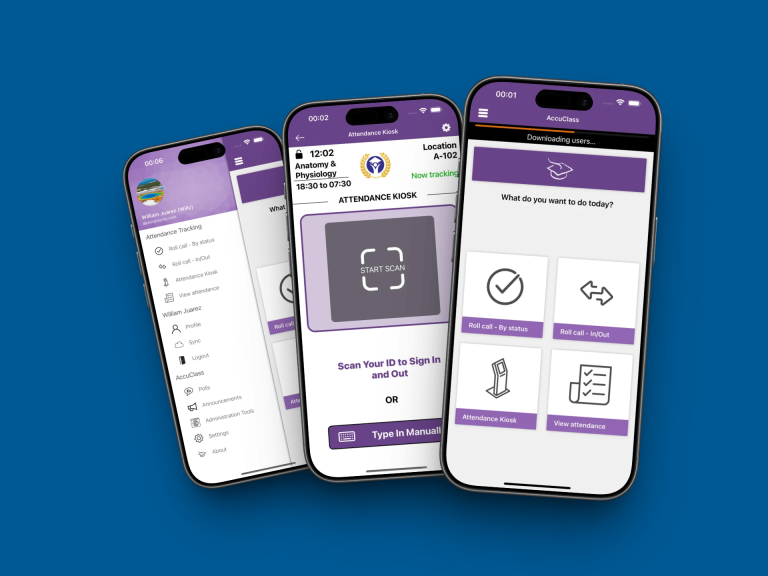
AccuClass
Let students check themselves in to class
Students check in and out by scanning the classroom QR code with their phone or swiping their ID card. AccuClass marks each student Present, Tardy, Left Early, or Absent by your rules, and alerts the instructor when absences reach your limit.
The QR code changes on a timer you set, so a code sent to a friend outside the room soon stops working
AccuCampus is a cloud-based university administration platform designed to improve collaboration across campus services. It acts as a centralized hub for tracking class and event attendance, managing tutoring and advising appointments, monitoring checkouts for materials and equipment, and gathering student feedback.
A typical workflow uses ID scans at events or centers to record attendance automatically. Engagement patterns become visible in dashboards, and early alert features can notify advisors when students show risk indicators such as repeated absences or low marks. By consolidating data and workflows, AccuCampus helps academic departments, student services, and administrators share insight and coordinate timely support.
Learn more: AccuCampus

Accudemia: Academic Center Management Made Easy
Operating learning labs, tutoring centers, or writing centers involves scheduling tutors, logging student visits, and evaluating which services have the most impact. Accudemia streamlines these tasks. Students schedule sessions online, tutors record session details, and administrators access reports on utilization and outcomes through an intuitive interface.
Why it matters: tutoring and supplemental instruction are consistently linked to improved course success. In one community college study, students who engaged in tutoring achieved a course success rate about seven percentage points higher than peers. Accudemia helps maximize those benefits by ensuring every session is captured, demand is visible by subject, and resources can be allocated to the areas of greatest need.
Learn more: Accudemia

AccuClass: Smart Attendance Tracking
Attendance tracking is foundational for student accountability and institutional reporting. AccuClass modernizes the process with mobile-friendly workflows and technologies such as QR codes, swipe cards, and biometrics. Instructors and facilitators can record attendance in seconds, with data stored in the cloud for immediate reporting.
Administrators can spot patterns like consecutive absences and trigger outreach quickly. Reducing manual errors saves instructional time and supports student success with timely follow-up. Attendance is closely tied to achievement and completion, so early alerts from a system like AccuClass help counselors and advisors intervene before gaps widen.
Learn more: AccuClass
All three solutions, AccuCampus, Accudemia, and AccuClass, illustrate how administrative ed tech tools create the conditions for learning to thrive. When attendance, tutoring, and engagement data are captured digitally, institutions can analyze patterns, such as whether students who attend three or more tutoring sessions earn higher grades or whether event participation correlates with improved first-year retention. With these insights, leaders can refine programs, target resources, and iterate policies. Most platforms also include messaging tools and user-friendly dashboards that make daily work more efficient.
It is worth noting that adjacent categories exist, including Student Information Systems and campus scheduling software. The priority is to select solutions that integrate well. Data flow is critical. Connecting attendance inputs to early alert workflows, for example, amplifies impact and reduces duplication.
Choosing the Right EdTech Tools: What to Consider
Selecting ed tech tools can feel overwhelming. A disciplined evaluation process prevents shiny-object purchases and ensures every tool advances learning or operational efficiency.
- Educational alignment. Define the problem the tool must solve. Clarify whether the objective is improving engagement, differentiating instruction, or automating an administrative process.
- Ease of use. Favor intuitive interfaces for staff and students. Pilot with a small group to surface friction. A tool that simplifies a process empowers adoption, while a steep learning curve creates resistance.
- Integration and compatibility. Confirm interoperability with your LMS and student information system. Look for straightforward import and export, and avoid data silos. For example, syncing attendance with a gradebook reduces manual entry and errors.
- Data privacy and security. Student data protection is non-negotiable. Verify compliance with applicable privacy laws such as FERPA in the United States. Seek transparency on data usage, access controls, and retention.
- Cost and sustainability. Consider the licensing model and long-term viability. Free tools can be valuable, but assess their support horizon. Evaluate return on investment by weighing time savings and outcome gains against cost.
- Support and training. Strong vendor documentation, tutorials, and responsive help desks accelerate implementation. Plan professional development so educators use advanced features with confidence.
- Evidence of effectiveness. Look for research, case studies, or credible testimonials that demonstrate impact. For an early alert platform, for instance, confirm whether peer institutions improved retention after deployment.
A practical approach is to form a cross-functional committee that includes teachers, IT, student services, and academic leadership. Run a time-boxed pilot with clear success criteria, collect feedback, and decide based on evidence rather than hype.
Exclusive Educational Tech Tips for Successful Implementation
Selecting great ed tech tools is only half the work. The other half is implementing them with intent, clarity, and support so they deliver measurable impact. The following guidance distills lessons learned from real deployments across schools and campuses.
Start with Clear Goals
Define what success looks like before you roll out a tool. Are you trying to increase participation, raise homework completion, or cut administrative time?
Translate the goal into trackable metrics. For example, if an interactive app is meant to boost engagement, measure the share of students responding to questions and trends in quiz scores over time. Clear targets focus effort and make it easier to judge impact.
Pilot and Scale Gradually
Resist the urge to launch everywhere at once. Run a focused pilot with one grade level, department, or a group of early adopters.
Use the pilot to surface issues, refine workflows, and document best practices. Early adopters often become internal champions who mentor colleagues once results are positive, scale in phases rather than attempting a single big-bang rollout.
Provide Training and Ongoing Support
Even excellent tools underperform without confident users. Offer hands-on workshops, concise how-to guides, and short videos.
Identify tech-savvy mentors who can provide informal coaching. After launch, maintain a clear support path, such as a help desk or a designated point of contact. When teachers know help is accessible, adoption and depth of use increase.
Integrate with Teaching Practices
Technology should strengthen pedagogy, not sit beside it. Encourage teachers to redesign lessons to leverage core features of the tool.
For instance, with an LMS, move direct instruction to short videos and reserve class time for discussion or problem solving. Share exemplar lesson plans in faculty meetings so practical ideas circulate. The principle is simple: pedagogy first, tool second.
Monitor Usage and Impact
Do not set and forget. Review analytics regularly: logins, completion rates, item analysis, and time-on-task.
Pair quantitative data with qualitative feedback from teachers and students. If outcomes lag, adjust configuration, provide refresher training, or revise the use case. Be ready to pivot if a tool does not fit your needs. Continuous improvement is part of effective implementation.
Read: Academic Monitoring in Higher Education
Foster a Positive Culture Around Ed Tech
Change can be stressful. Celebrate small wins and let teachers share what worked at staff meetings.
Address concerns directly and respectfully. Emphasize that ed tech tools support instruction rather than replace teacher judgment. Where AI-assisted planning or grading is introduced, position it as workload relief and a way to return more time to high-value teaching tasks.
Ensure Equity and Accessibility
Plan for device and connectivity gaps. Offer offline access where possible, provide loaner devices, or allocate on-campus time for online tasks.
Verify accessibility features such as captioning, screen reader compatibility, and keyboard navigation. Provide simple student tutorials and tip sheets for families so every learner can participate fully. Equity is a design requirement, not a nice-to-have.
Put It All Together
When schools pair clear goals with thoughtful pilots, robust training, active monitoring, a supportive culture, and equitable access, ed tech tools avoid common pitfalls like low adoption or superficial usage. Treat implementation as iterative. Learn from each cycle, refine the playbook, and build a tech-savvy culture that steadily improves teaching and learning.
Emerging Trends in Ed Tech: What’s Next?
The landscape of ed tech tools continues to evolve. Staying informed helps educators and administrators plan investments, align curricula, and prepare students for a changing world. Below are the most relevant developments to watch and practical ways to explore them.
Artificial Intelligence in Education
AI has moved from concept to classroom utility. From lesson plan generation and quiz creation to writing analysis and adaptive practice, schools are piloting AI to save time and personalize learning. Recent surveys suggest that roughly 60% of teachers use AI in some part of their routine. Treat AI as a partner, not a replacement. A sound workflow is to have AI draft formative questions or rubrics, then apply teacher judgment for accuracy, alignment, and fairness. Establish clear usage policies, data safeguards, and bias checks before scaling.
Virtual Reality and Augmented Reality
VR and AR bring experiential learning into subjects that benefit from spatial understanding. Virtual field trips, lab simulations, and historical site explorations can boost engagement and retention. Hardware costs are trending down, which is expanding access. Start small with a single module or lab rotation, define the learning objective upfront, and assess whether the immersive experience improved concept mastery relative to traditional methods.
Data Analytics for Personalized Learning
Institutions are consolidating performance data from LMS activity, assessments, tutoring visits, and attendance. Modern analytics dashboards and early alert systems turn this data into action, helping identify students who need timely support. Case studies report sizable gains, including reductions in course withdrawals and increases in pass rates when alerts trigger targeted outreach. Begin with a limited set of indicators such as missed assignments and quiz performance, then refine thresholds as your team gains confidence.
Integration of Ed Tech Ecosystems
Schools are moving from standalone apps to integrated suites. Single sign-on, shared data layers, and API-driven connections create smoother user experiences and cleaner reporting. When evaluating ed tech tools, map required integrations in advance. Confirm that the LMS, video platform, assessment system, and analytics layer interoperate without manual exports. Strong ecosystems lower support overhead and improve adoption.
Focus on Digital Equity and Inclusion
Equity remains central. One-to-one device programs, connectivity support, and accessibility features such as captioning, screen reader compatibility, and keyboard navigation should be part of every rollout plan. Ensure interfaces are culturally responsive and multilingual where appropriate. Provide offline options or on-campus access windows so students without reliable internet can participate fully.
How to Explore These Trends Sensibly
Adopt a test-and-learn approach. Run short pilots with clear success criteria, capture both quantitative and qualitative evidence, and scale what works. Involve students in feedback cycles. Professional learning communities and peer showcases accelerate responsible adoption and help separate durable value from short-lived hype.
Conclusion: Embracing Ed Tech for a Brighter Educational Future
Educational technology is now foundational to effective teaching and efficient operations. From classroom engagement to campus-wide services, ed tech tools touch every facet of learning. The strongest results appear when technology choices are aligned to instructional goals, implemented with thoughtful training, and measured against clear outcomes.
Start with small, well-defined use cases. Validate impact on student engagement, learning, or workflow efficiency. Share wins, iterate where needed, and retire tools that do not deliver. Build a culture where teachers and students feel empowered to try new approaches and where data informs decisions without overshadowing professional judgment.
Used thoughtfully, ed tech tools can personalize learning, surface at-risk students early, streamline administrative tasks, and free educators to focus on high-value teaching. The schools that thrive will be those that blend strong pedagogy with capable technology and a commitment to equitable access. The next step is simple. Choose one promising use case, run a focused pilot, measure outcomes, and expand with confidence.