
If you run a learning center, advise students or coordinate student success, you know that students rarely fail a course without warning. Absences, missing assignments and skipped tutoring visits are usually on record weeks before the final grade. Each one sits in a different system, though, so nobody sees them together while there is still time to help.
Identifying at-risk students therefore starts with the data your campus already holds. What decides the outcome is whether those signs reach a named person early in the term, and whether that person acts.
Key takeaways
- An at-risk student is one whose circumstances or behavior predict course failure or withdrawal without help.
- Class attendance and tutoring center visits give the earliest warning, while grades usually confirm the problem around midterm.
- An early alert system works when faculty can report a concern quickly, every alert has an owner, and the person who reported it hears back.
- You judge an early alert program by its follow-through, which shows whether flagged students got help and stayed enrolled.
What is an at-risk student?
An at-risk student is a student whose circumstances or current behavior predict course failure or withdrawal unless someone intervenes. Risk shows up at different times, and you respond to it differently depending on when it appears.
Risk a student brings to campus
Some students arrive with risk already in place. They may be the first in their family at college, under financial strain, juggling work hours that collide with class times, or on academic probation from a prior term. You can often see this kind of risk at enrollment, so it calls for outreach in the first weeks of the term.
Risk that develops during the term
Other students become at risk during the term, and this form shows up in behavior. Attendance slips, submissions stop, and support services go unvisited. This is the risk an early alert system is built to catch, because it changes week by week and only current data reveals it.
The warning signs of an at-risk student
Warning signs often arrive in a similar order, and knowing that order tells you where to look first. Attendance usually moves first, then work completion, then grades. Grades arrive late, so by the time a midterm grade shows the problem, half the term is already gone.
Academic warning signs
These are the signs your campus can already see, roughly in the order they tend to appear:
- Absences start to cluster.
- The student stops visiting the tutoring or learning center, or never starts.
- Assignments arrive late, then stop arriving.
- Participation in class fades.
A missing tutoring visit is not a warning sign by itself, because many students who are doing fine never need the center. It becomes one when it sits beside absences or missing work, since a student who is falling behind and not seeking help is the student your alerts exist for. On any campus that tracks center visits, it is also one of the earliest signs you can measure.
Warning signs only people notice
Some signals never reach the systems that faculty and advisors check. A family emergency, money trouble or extra hours at an off-campus job usually come to light through a person, such as a professor who noticed something was off. That is why your early alert process needs a referral route that people can use, alongside rules that watch your data.
You can also act before any of these signs appear. The tactics in our guide to keeping students engaged before they drift work on the same early timeline.
Why campuses identify at-risk students late
Most campuses have the warning signs but no process that brings them together and puts them in front of someone who can act. Three gaps tend to cause the delay.
The signals sit in separate systems
On your campus, each office probably holds one piece of the picture. The LMS (learning management system) has submissions, the student information system (SIS) has enrollment and holds, the gradebook has midterm grades, and your center’s sign-in records show who asks for help. No single system looks alarming on its own, and nobody’s job is to read all four together.
Reporting a concern takes too much effort
If your reporting process is clumsy, a faculty member with a worried feeling about a student will simply not use it. The Center for Student Success at Southern University at Shreveport saw this with its homegrown early alert system, which proved too hard for faculty to use. Calumet College of St. Joseph ran academic alerts through a form on its website, which notified one office at a time, never told the student, and needed a new submission for every update.
Faculty never hear back
When a professor reports a student and hears nothing, it is natural to conclude the report went nowhere and to stop reporting. Referrals then drop, and the office can read that quiet as fewer struggling students, while the real number shows up later in your retention figures.
Accudemia
Your center helps more students than you can prove
Accudemia records every visit, appointment, and session on its own, then builds the reports deans, funders, and accreditors ask for. One college counted over 4,000 visits its previous tools had missed.
96 percent renewal across 500+ academic centers

What is an early alert system?
An early alert system is the campus process that turns a warning sign into an intervention someone owns. It captures a signal, routes it to a named person, records every contact with the student, and closes only when the situation is resolved or deliberately handed off. Alongside those four steps you measure what happened from the first week, so that by the end of the term you know whether the alerts led anywhere.
Capture should work two ways. Automated rules watch your data for patterns such as absence counts, attendance percentages or missed submissions, while people send referrals about the things no threshold can see.
Campus emergency notification tools are also called alert systems, but they do a different job. An academic early alert concerns one student, weeks before a deadline, while an emergency alert reaches the whole campus minutes after an incident.
Questions to ask before you choose a tool
Whichever system you consider, these questions tell you whether it will fit the way your campus works:
- Which of your systems does it read from, and how often does that data update?
- Who can see a flag, and how does it handle student privacy under FERPA?
- What does a flagged student receive, and who decides the wording?
- How will you spot false alarms, and can you adjust the rules during the term?
How to build a referral loop faculty will use
Your faculty will send referrals when sending one takes less effort than worrying, and when they hear what happened afterward. The campuses below built their loops around those two conditions.
How three campuses rebuilt their referral loops
Southern University at Shreveport chose Accudemia, the academic center management software we make, mainly for its referral feature after its homegrown system failed. A referral about an at-risk student goes to a Success Coach, the staff member who contacts the student. The faculty member who made the referral is alerted at every contact, update and agreed action until the referral closes with the student back on track. We have published a fuller account of how Shreveport rebuilt its alert process around its Success Coaches, from intake to the faculty loop.
At Kishwaukee College, a small community college in Illinois, faculty concerns go through advisors, who turn them into referrals. The college then tracks whether the referred student attends and tells the faculty member whether the student followed through. Calumet College of St. Joseph replaced its web form with referrals that inform several departments at once, notify the student automatically, and keep one record that updates with every change.
What to copy, whatever platform you use
These habits work on any system, and they are worth building in from the start:
- A referral template with required questions, so every alert arrives with the information your center needs to act.
- An email to a named follow-up owner on submission, with copies to the staff listed on the referral.
- A permanent referral history that keeps every edit and follow-up comment, so the case survives a handoff between staff.
Make attendance data part of your alerts
Class attendance and support-center sign-ins are the earliest warning signs you have, and they are the ones most often left out of the alert process. Davis & Elkins College shows how much of that data can go uncounted. After it moved its center onto Accudemia, it recorded over 4,000 more visits than the prior year’s tools had captured, and it learned that its center was assisting 61 percent of its students. Its stakeholders now receive recurring reports on at-risk students automatically, instead of a summary once or twice a term.
Attendance can feed your alerts from the classroom, from campus-wide data, and from the center itself. We make a separate product for each, so you can start with the one that matches where your signals live.
In the classroom
AccuClass, our class attendance software, includes a Retention Center that flags students by rule, based on absence counts, consecutive absences or an attendance percentage. You can limit a rule to a group such as student athletes. Each alert notifies the student, the instructor and a third person you name, and administrators receive a weekly summary.
Across the campus
AccuCampus, our campus-wide student services platform, scores each student’s dropout risk every week from your institution’s own records, which can include center visit counts. The score appears on the student’s profile, where the advisor working with that student already looks, and who may see it is a permission of its own. Scoring needs several semesters of your data before the first predictions arrive, and its documentation is clear that a score is a signal for a person to act on, not a verdict about the student.
In the center
Accudemia handles the people side of capture. Its alerts are referrals raised by instructors and tutors, and it ties those referrals, sign-in stations and per-session assessments into one record. That is how Shreveport tracks whether its at-risk students follow through, both in person and virtually.
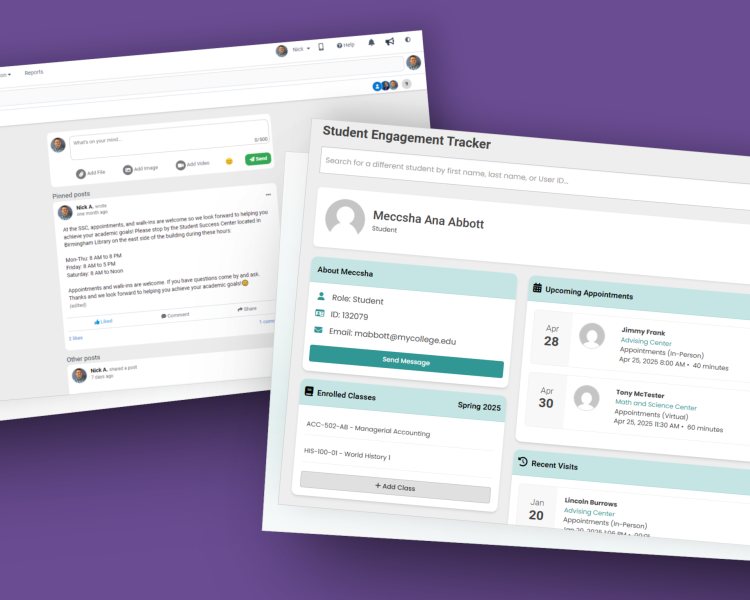
If your center already collects sign-ins but your early alerts still run on email and memory, request an Accudemia demo and see the referral loop working with your own intake, coaches and reports.
How to tell whether your early alerts work
Judge your early alert program by follow-through rather than referral volume. A rising referral count shows that your faculty are worried, and what you need to know is whether flagged students came in for help and stayed enrolled. That is why Shreveport pulls follow-through reports on its referred students, and why Santa Barbara City College’s Institutional Research office uses its center data to show the effect on retention and success term after term.
This evidence also protects your budget. The Community College of Denver’s EXCEL! Zone built its Session Assessment questionnaire (the questions tutors answer after each session) with Institutional Research, so the notes tutors record map directly to what the state requires for funding. In 2020, data showing the center’s impact on student success saved it from being shut down. When a budget committee reviews your center, it will ask for numbers, so it pays to collect them from the first week.
Early alerts get a struggling student to the right person. What that person does next is the other half of retention, and our student retention guide for center directors covers it, from first outreach to end-of-term measurement.
Where to start this term
You do not need a new system to begin. Most campuses can start with data they already hold and one route for referrals, then add tools once the process works. Start with these steps:
- List the signals your campus already captures, such as class attendance, center sign-ins, LMS submissions and holds.
- Choose one referral route and tell every faculty member about it.
- Give every alert a named owner from the first day.
- Measure follow-through from the first week, because that number shows whether the alerts work and makes the case for funding them.