
You picked a reputable payment processor, built a clean registration page, and watched the transactions roll in for weeks before the conference. Then the event ended, and your team spent the next two weeks in a spreadsheet, manually matching payment records to session attendance logs so you could issue CEU certificates. Fourteen days of back-and-forth with your finance coordinator, three name mismatches that nearly invalidated nursing credits, and a dozen angry emails from attendees whose license renewal deadlines had already passed.
That’s the gap most organizers don’t see until it’s too late. Choosing an event payment platform based on transaction fees and checkout design is like choosing a venue based on the lobby. The real cost shows up downstream, in reconciliation hours, delayed certificates, and compliance exposure that no fee comparison chart will warn you about.
What event payment platforms actually handle
A generic payment gateway processes a transaction. It takes a card number, authorizes the charge, and deposits funds. That’s the end of its job. An event payment platform wraps that transaction in registration logic: the charge is tied to a named attendee, a session roster, a ticket type, and a financial dashboard that tracks revenue in real time.
The distinction matters because event payments span a full financial lifecycle. Pre-event, you’re collecting registration fees, applying early-bird discounts, and invoicing sponsors who pay by purchase order. On-site, you’re handling walk-in registrations, badge pickups, and last-minute session upgrades. Post-event, you’re reconciling refunds, generating revenue reports, and matching payment records to attendance data for compliance documentation.
Payment method coverage has become non-negotiable. According to the McKinsey Global Payments Report 2024, digital wallets accounted for roughly half of global e-commerce transaction value in 2023. The Federal Reserve Payments Study found that card payments represented over 76% of all non-cash U.S. payments by number. Your event management platform needs to accept credit and debit cards, Apple Pay, Google Pay, and QR code checkout without requiring extra configuration for each method. It also needs to support invoicing for institutional buyers, universities, government agencies, and professional associations that pay by purchase order, not credit card.
A platform that only handles card checkout forces you to manage invoicing in a separate tool. That creates the first reconciliation gap before the event even starts.
How fee structures differ across payment processors
Every card transaction carries three layers of cost, and most organizers only see the blended rate their processor quotes. The first layer is interchange fees, set by the card networks and non-negotiable. The second is scheme or assessment fees charged by the network itself. The third is the processor’s margin on top. When a processor quotes you a flat 2.9% + $0.30 per transaction, those three layers are bundled together. You can’t negotiate the first two, but the third is where pricing models diverge.
The two dominant models are percentage-based and flat-subscription. Percentage-based pricing charges a fixed percentage plus a per-transaction fee on every sale. Subscription models charge a monthly or annual fee and offer lower per-transaction rates in exchange.
Where the math gets interesting. Say you’re running a 300-attendee conference with a $200 registration fee. At a typical percentage-based rate of 2.9% + $0.30 per transaction, you’d pay roughly $1,830 in processing fees. A subscription-based platform might charge $1,200 per year with a per-transaction rate closer to 1.5% + $0.15, bringing your processing cost down to around $945 for the same event. The subscription pays for itself at that volume.
But the transaction rate isn’t where organizers lose the most money. Currency conversion fees hit international attendees at 1–3% on top of the base rate. Chargeback fees typically run a flat amount per dispute regardless of outcome: you pay even if you win. And some processors keep the original transaction fee after a full refund, meaning you eat the processing cost on revenue you returned.
Then there’s the invoice problem. Institutional buyers don’t pay by credit card. A platform that only supports card checkout forces you to handle purchase orders manually, emailing invoices, tracking payments in a spreadsheet, and reconciling those payments against your registration list by hand. That reconciliation gap is where errors compound, and it’s entirely avoidable with a platform that supports invoicing natively alongside card payments.
Conference Tracker
Check people in fast. Prove they were there.
Conference Tracker scans attendees with the phones your staff already carry, tracks time in every session, and issues certificates and CEU transcripts on its own. One conference ran 2,623 attendees across 186 sessions on it.
30+ years building attendance tracking for events and education

The real problem: what happens after the payment clears
So what actually breaks when your payment data lives in one system and your attendance data lives in another?
The answer is certificates. For any conference that awards CEU credits, nursing, accounting, engineering, social work, the certificate is the deliverable attendees care about most. And generating that certificate requires matching three records: the payment record (proving the attendee paid), the registration record (confirming their identity and credentials), and the session check-in log (verifying they actually attended the required hours).
When those records live in separate tools, someone has to merge them. The workflow looks like this: export the payment CSV, export the attendance CSV, run a VLOOKUP or manual match on name and email, flag mismatches, resolve duplicates and typos, then generate certificates one by one or in a mail merge. For a 500-person nursing conference, this process routinely consumes 15–20 hours of staff time. We’ve seen this pattern across dozens of professional association events: the reconciliation step is always the bottleneck, and it’s always underestimated in pre-event planning.
The compliance risk is specific and measurable. A single attendee name mismatch between a payment record and a session check-in log is enough to invalidate a CEU certificate under most state licensing board standards. This isn’t theoretical. It’s the specific failure that triggers audit findings for nursing and accounting continuing education events. A registrant who paid but never checked into sessions still appears as “paid” in the payment system. Without attendance verification tied to that same record, the organizer has no way to distinguish between someone who attended and someone who didn’t, and both get credited.
For conferences with 1,000+ attendees, the merge step routinely delays certificate delivery by 5–10 business days. That delay is the number one post-event complaint from attendees who need credentials for license renewal deadlines.
Contrast that with an integrated workflow where payment, registration, session check-in, and certificate generation all share a single attendee record. No export. No merge. No mismatch risk. The attendee pays, checks into sessions via badge scan, accrues verified credit hours automatically, and receives a certificate the same day the event ends.
What to evaluate beyond transaction fees
The transaction rate is the easiest number to compare and the least important one to optimize for. What actually determines your post-event workload:
- Registration-to-payment data flow. Does the payment attach to an attendee record, or just a transaction ID? If the payment system only gives you a charge amount and a card’s last four digits, you’re building the attendee connection manually.
- Discount code and promo support. Can you create early-bird, group, or sponsor comp codes that apply at checkout and reflect in your financial dashboard automatically? Or do you need a third-party coupon tool that doesn’t sync back to your registration list?
- Automated payment reminders. Does the platform chase overdue invoices with configurable follow-up emails, or does your staff send those manually?
- Refund and cancellation handling. When you process a refund, does the attendee roster and session count update automatically? Or do you have to update both the payment system and the registration system separately?
- Financial reporting. Can you pull a single report showing revenue by ticket type, sponsorship tier, and payment method without exporting to a spreadsheet?
The trade-off between a standalone best-in-class payment processor and an integrated event platform with built-in payment processing comes down to this: the standalone processor might save you a fraction of a percent on transaction fees, but the integration labor and error risk from disconnected systems almost always cost more than the fee savings. If you’re evaluating ticketing and event software, the payment integration should be the first question you ask, not the last.
Payout timing is another practical concern that rarely appears in feature comparison charts. Some processors hold funds for 5–7 business days or impose rolling reserves on new accounts. If you need to pay a venue deposit before your event revenue clears, that hold creates a cash flow gap that no transaction fee savings will cover.
Security, PCI compliance, and attendee trust
Any platform that handles card data must meet PCI DSS (Payment Card Industry Data Security Standards) requirements. The safest approach for organizers is a platform that uses tokenized checkout; your system never touches raw card data. The processor handles the sensitive information, and your event platform only stores a token that references the transaction.
The specific failure mode to watch for: an organizer embeds a simple HTML payment form on their event page without PCI-compliant hosting. If that form is compromised, the organizer, not the payment processor, is liable for the breach and associated fines. This happens more often than you’d expect with smaller associations that build registration pages on general-purpose website builders and bolt on a payment form.
For organizers running international conferences, the EU’s Payment Services Directive 3 (PSD3) introduces stronger anti-fraud and consumer protection requirements that affect cross-border event payments. Your payment platform needs to support Strong Customer Authentication (SCA) for European attendees, which requires two-factor verification for online card payments. If your checkout flow doesn’t support SCA, European attendees will see their transactions declined, and most won’t try a second time.
Checkout design also affects completion rates. Attendees are more likely to finish registration when checkout happens on a branded, professional-looking page rather than a redirect to a generic payment gateway. Embedded checkout that matches your event’s branding reduces abandonment. A redirect to an unfamiliar domain, even a trusted one, introduces friction at the exact moment the attendee has committed to paying.
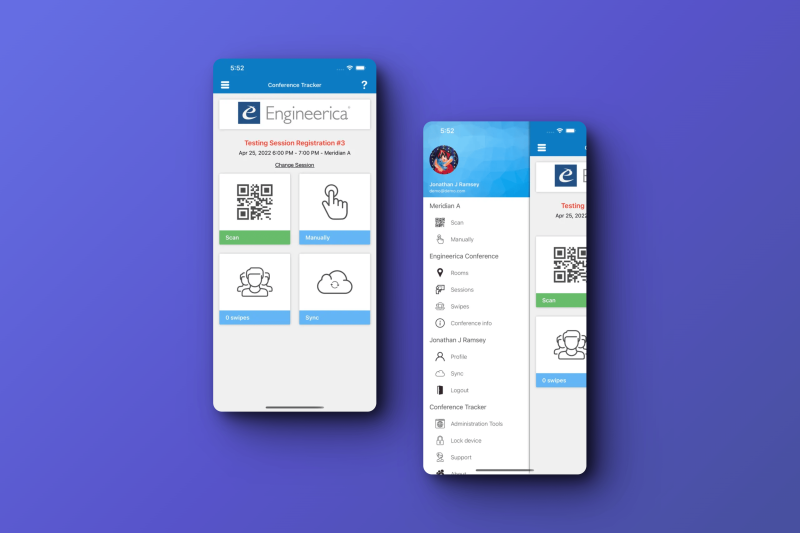
How Conference Tracker handles event payments end to end
Conference Tracker integrates directly with Stripe, PayPal, and Authorize.net, so you choose your preferred processor without being locked into a single gateway. The payment is embedded into branded registration pages, attendees never leave your event site to complete checkout. That eliminates the redirect friction and keeps the experience consistent with your event branding.
Discount codes and promotional pricing
You create early-bird pricing codes, group discount codes, or sponsor comp codes directly in the platform. They apply automatically at checkout and reflect in the financial dashboard without manual adjustment. No third-party coupon tool, no post-event reconciliation to figure out which discounts were applied to which registrants.
Automated payment reminders
The system sends configurable follow-up emails to registrants who started but didn’t complete payment. You set the timing and frequency. This replaces the manual process of pulling a list of incomplete registrations, drafting reminder emails, and tracking who eventually paid, a task that can eat several hours per week in the lead-up to a large conference.
Financial dashboard
Revenue from registrations and sponsorships appears in a single view, broken down by ticket type, payment method, and payment status. No CSV export. No spreadsheet merge. You can see at a glance how much revenue has cleared, how much is pending, and which invoices are overdue.
The downstream connection that matters most
Because payment, registration, session attendance, and CEU credit calculation all share a single attendee record in Conference Tracker, the reconciliation problem described earlier simply doesn’t exist. A paid registrant who checks into sessions via badge scan automatically accrues verified credits. Certificates can go out the same day the event ends, not five to ten business days later.
This is the core argument for evaluating event payment platforms as part of your complete event management stack rather than in isolation. The processor handles the money. The platform handles everything the money needs to connect to.
The decision that actually saves you time
The counterintuitive part: the processor you choose matters less than how cleanly it connects to your registration, attendance, and compliance workflows. A low transaction fee means nothing if you spend 20 hours reconciling payment records with attendance logs after every event. The organizers who save the most time aren’t the ones who negotiated the best rate, they’re the ones who eliminated the manual handoffs between payment and everything that comes after it.
Before signing with any event payment platform, map the data flow from the moment an attendee pays to the moment they receive their certificate or receipt. Count the manual handoffs. Every handoff is a place where errors accumulate, staff hours disappear, and attendee complaints originate. If your current setup requires even one CSV export to connect payment data to attendance data, that’s the bottleneck worth solving, and it’s worth more than any fraction of a percent you’d save on processing fees.